
ASP.NET Core Web API(一):Controller 架構核心實戰
你的第一個 ASP.NET Core Web API 長什麼樣子?從路由、DI、Model Binding 到 Middleware,把 Controller-based API 的核心拼圖講清楚,並告訴你什麼時候這套是正確選擇。
目錄
系列文章地圖
點節點可以直接跳到那一篇。
在 .NET 生態系裡,如果你要寫一個供前端(React、Vue)或 App 消費的後端 API,ASP.NET Core 是最正統的選擇。它快、類型安全、微軟自家維護,而且隨著 .NET 8/9 的更新越來越現代。
但對很多從 Python FastAPI 或 Node.js Express 跳過來的人來說,面對 Controller、Route、ModelState、IServiceCollection 這一堆東西,很容易一開始就被嚇跑了。
這篇的目標是:從一個真實的產品 API 場景出發,把 Controller-based 架構的核心概念串起來,讓你知道每一塊是幹嘛的、什麼時候該用。
為什麼先講 Controller-based,而不是直接用 Minimal API?
Minimal API 很誘人(下一篇會講),但它預設你已經知道「為什麼要有 Controller」。
Controller-based 架構在 .NET 裡存在超過十年,它代表了一套成熟的慣例:
- 路由的慣例
- 驗證的慣例
- DI 注入的慣例
- 錯誤回傳的慣例
懂了這套慣例,之後不管換到 Minimal API 還是 Vertical Slice,你才知道自己「省略了什麼」。
一個真實場景:Todo List API
我們用一個 Todo List 的 CRUD API 來走完所有核心概念。
GET    /api/todos         → 取得所有
GET    /api/todos/{id}    → 取得單筆
POST   /api/todos         → 新增
PUT    /api/todos/{id}    → 更新
DELETE /api/todos/{id}    → 刪除
專案結構
MyTodoApi/
├── Controllers/
│   └── TodosController.cs
├── Models/
│   ├── Todo.cs
│   └── CreateTodoRequest.cs
├── Services/
│   ├── ITodoService.cs
│   └── TodoService.cs
└── Program.cs
這是 Controller-based 的典型分層:Models 負責資料、Services 負責邏輯、Controllers 負責路由收發。
Controller:路由的入口
[ApiController]
[Route("api/[controller]")]
public class TodosController : ControllerBase
{
    private readonly ITodoService _todoService;

    public TodosController(ITodoService todoService)
    {
        _todoService = todoService;
    }

    [HttpGet]
    public async Task<ActionResult<IEnumerable<Todo>>> GetAll()
    {
        var todos = await _todoService.GetAllAsync();
        return Ok(todos);
    }

    [HttpGet("{id}")]
    public async Task<ActionResult<Todo>> GetById(int id)
    {
        var todo = await _todoService.GetByIdAsync(id);
        if (todo is null) return NotFound();
        return Ok(todo);
    }

    [HttpPost]
    public async Task<ActionResult<Todo>> Create(CreateTodoRequest request)
    {
        var todo = await _todoService.CreateAsync(request);
        return CreatedAtAction(nameof(GetById), new { id = todo.Id }, todo);
    }
}
這裡有幾個關鍵值得解釋:
[ApiController] 做了什麼?
這個 Attribute 不只是裝飾。它幫你開啟了幾個自動行為:
- 自動 400 驗證:如果 Request body 不符合 Model 定義,直接回傳 400,不用你手寫
if (!ModelState.IsValid) - 自動推斷綁定來源:
[FromBody]、[FromRoute]、[FromQuery]可以省略,ASP.NET Core 會自己猜
[Route("api/[controller]")] 的 [controller] 佔位符
[controller] 會被自動替換成 Controller 類別名去掉 "Controller" 這個字。所以 TodosController 的路由前綴就是 /api/todos。
回傳 ActionResult<T> vs 直接回傳 T
直接回傳 Todo 也行,但 ActionResult<Todo> 讓你在同一個方法裡可以回傳 Ok(todo)、NotFound()、BadRequest() 這些不同的 HTTP 狀態碼。這對 API 設計來說更語意清楚。
Model Binding:Request 資料怎麼進來的
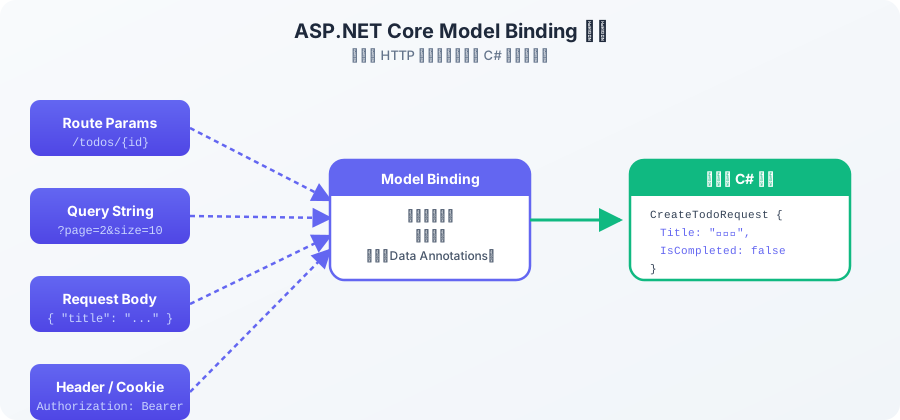
圖說:ASP.NET Core 的 Model Binding 自動從不同來源組裝成強型別的 C# 物件。
ASP.NET Core 的 Model Binding 系統會自動從以下來源把資料組裝成你的 C# 物件:
- Route:
/api/todos/{id}的id - Query String:
/api/todos?page=2的page - Body (JSON):POST/PUT 的 Request Body
public record CreateTodoRequest(
    [Required][MaxLength(200)] string Title,
    bool IsCompleted = false
);
用 Data Annotations 在 Model 上定義驗證規則,配合 [ApiController] 自動觸發,不需要在每個 Action 方法裡寫驗證邏輯。
Dependency Injection:Service 怎麼注入的
Program.cs 是整個應用程式的進入點與設定中心:
var builder = WebApplication.CreateBuilder(args);

// 1. 註冊服務
builder.Services.AddControllers();
builder.Services.AddScoped<ITodoService, TodoService>();
builder.Services.AddEndpointsApiExplorer();
builder.Services.AddSwaggerGen();

var app = builder.Build();

// 2. 設定 Middleware Pipeline
if (app.Environment.IsDevelopment())
{
    app.UseSwagger();
    app.UseSwaggerUI();
}

app.UseHttpsRedirection();
app.UseAuthorization();
app.MapControllers();

app.Run();
AddScoped<ITodoService, TodoService>() 的意思是:每次 HTTP Request 進來,就建立一個新的 TodoService 實例,這個 Request 結束就銷毀。ASP.NET Core 有三種 Lifetime:
| Lifetime | 建立時機 | 適合場景 |
|---|---|---|
Singleton | 程式啟動時建立一次 | 設定物件、共用快取 |
Scoped | 每個 HTTP Request 一個 | DbContext、大多數 Service |
Transient | 每次 DI 注入都建立新的 | 輕量工具類別 |
Middleware:Request 和 Response 的中間站
Middleware 是 ASP.NET Core 的核心概念。每個 Request 進來,都要「穿越」一道道 Middleware 才能到達你的 Controller。Response 出去時反向再穿越一次。
Request
  ↓
[HTTPS Redirection]
  ↓
[Authentication]
  ↓
[Authorization]
  ↓
[Your Controller]
  ↑
[Your Controller]
  ↑
[Authorization]
  ↑
[Authentication]
  ↑
[HTTPS Redirection]
  ↑
Response
app.UseXxx() 的順序非常重要。UseAuthentication() 必須在 UseAuthorization() 之前,否則 Authorization 不知道當前使用者是誰。
Controller-based 什麼時候是正確選擇?
看到這裡,你大概對 Controller 架構有感覺了。那它什麼時候適合、什麼時候不適合?
適合 Controller-based 的場景
中大型企業應用:複雜的業務邏輯、多個 API 端點、需要複雜的 Filter 和 Middleware
團隊已熟悉 MVC 模式:約定俗成的目錄結構,新人上手快
需要豐富的框架特性:內建的 Model Validation、ActionFilter、IActionResult 子型別
長期維護型專案:明確的分層邊界,重構更安全
如果你的 API 端點很簡單、追求最快啟動速度,或者想要體驗更函數式的開發方式,那下一篇的 Minimal API 可能更適合你。
延伸閱讀
相關文章
ASP.NET Core Web API(三):Vertical Slice Architecture 與 AI 開發
為什麼 Vertical Slice Architecture 正在取代傳統分層架構?Feature Folder + MediatR + CQRS 的組合如何讓 AI Coding Agent 輕鬆寫出正確的功能?含完整 ASP.NET Core 實作範例。
ASP.NET Core Web API(二):Minimal API 輕量高效設計
Minimal API 讓你用 10 行程式碼就能起一個 HTTP API,但 Program.cs 5000 行的地獄是真實存在的。搞懂 Minimal API 的優勢、組織方式、和 Controller 的取捨邊界。
留言討論
Facebook 留言