
- Published on
四級驗證與自動修復:拆解 GSD Verifier 的 Agent 設計與工程實作
Table of Contents
在上一篇 Wave 執行策略中,我們拆解了 GSD 如何透過 Dependency Graph 把任務分波次平行跑。但平行跑完之後,誰來確認產出是完整的?Agent A 寫了元件、Agent B 寫了 API,如果沒人驗證它們有沒有串起來,那只是「看起來寫完」。
這篇直接進 GSD 原始碼,拆解 Verifier 的三個面向:Agent Prompt 怎麼寫的、背後的工具是什麼、Orchestrator 怎麼呼叫它和路由結果。
Orchestrator 呼叫 Verifier 的完整流程
先看全局。在 execute-phase.md 工作流中,所有 Wave 跑完後,Orchestrator 會執行 verify_phase_goal 步驟:
// execute-phase.md 中的 verify_phase_goal 步驟
Task(
  prompt="Verify phase {phase_number} goal achievement.
  Phase directory: {phase_dir}
  Phase goal: {goal from ROADMAP.md}
  Check must_haves against actual codebase.
  Create VERIFICATION.md.",
  subagent_type="gsd-verifier",
  model="{verifier_model}"
)
Verifier 跑完後,Orchestrator 用一行 grep 讀取結果:
grep "^status:" "$PHASE_DIR"/*-VERIFICATION.md | cut -d: -f2 | tr -d ' '
然後根據 status 做硬性路由:
passed→ 標記 Phase 完成,更新 ROADMAP.mdgaps_found→ 把 Gaps 餵給 Planner 產 Fix Plan,再派 Executor 修,修完重跑 Verifierhuman_needed→ 自動化查核全過,但有些東西必須人眼確認(UI 外觀、即時互動等)
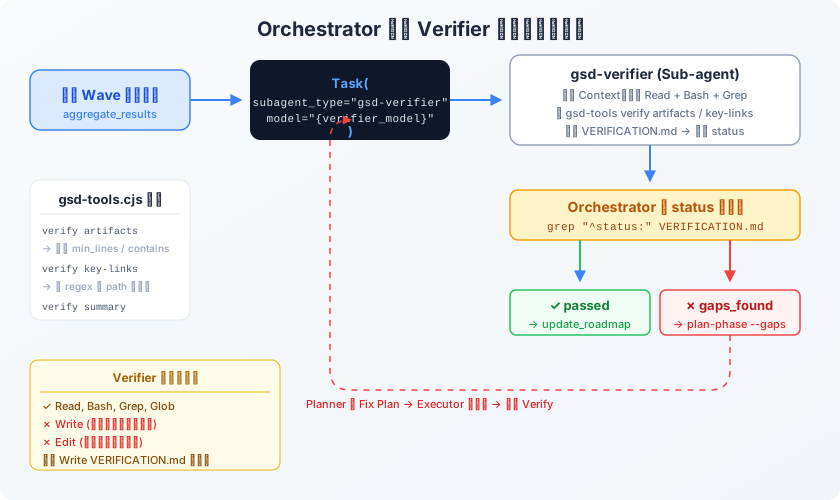
圖說:Verifier 是獨立的 Sub-agent,在自己的 Context 中跑完查核後回傳 status,由 Orchestrator 做路由決策。gaps_found 會觸發自動修復閉環。
重點:Verifier 自己不能修程式碼。它的 Prompt 裡明確限制工具只有 Read, Bash, Grep, Glob,沒有 Write 和 Edit。它只能產出 VERIFICATION.md 報告,然後交還主控權。修復是 Planner + Executor 的事。
gsd-verifier 的 Prompt 怎麼寫的
GSD 的 Verifier Agent Prompt 在 agents/gsd-verifier.md,總共 700 行。它不是叫 AI「請幫我檢查一下程式碼有沒有問題」,而是把整個驗證 SOP 寫死在 Prompt 裡,包含具體的 Bash 指令。
Prompt 的核心結構:
<role>
You are a GSD phase verifier.
CRITICAL: Do NOT trust SUMMARY.md claims.
SUMMARYs document what Claude SAID it did.
You verify what ACTUALLY exists in the code.
</role>

<verification_process>
  Step 0: 有沒有之前的 VERIFICATION.md?有的話進 RE-VERIFICATION 模式
  Step 1: 載入 Context(PLAN.md、ROADMAP.md)
  Step 2: 建立 must_haves(從 PLAN frontmatter 或 ROADMAP 推導)
  Step 3: 驗證 Observable Truths
  Step 4: 驗證 Artifacts(四級)
  Step 5: 驗證 Key Links(串接)
  Step 6: 需求覆蓋率
  Step 7: Anti-Pattern 掃描
  Step 8: 哪些東西需要人類測
  Step 9: 判定整體 status
  Step 10: 結構化 Gaps 輸出(YAML)
</verification_process>

<stub_detection_patterns>
  // 直接在 Prompt 裡教 AI 認 Stub:
  return <div>Placeholder</div>     // RED FLAG
  onClick={() => {}}                // RED FLAG
  return Response.json([])          // RED FLAG(沒有 DB 查詢的空回傳)
</stub_detection_patterns>
=> Verifier 的 Prompt 本質上是一份「Code Review Checklist 的自動化執行手冊」,AI 只是負責跑手冊上的指令然後填表。
四級驗證是工具強制還是 Prompt 驅動?
這是最關鍵的區別。答案:兩者合用,Level 1-2 是 Node.js 工具強制,Level 3-4 是 Prompt 驅動 AI 跑 grep。
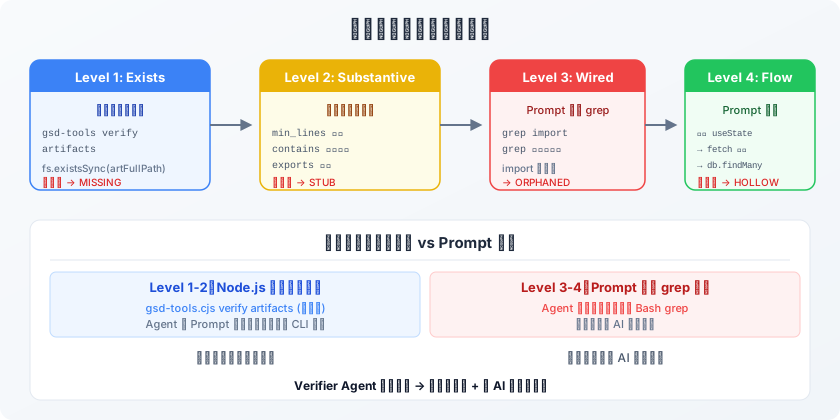
圖說:Level 1-2 由 gsd-tools.cjs 硬邏輯執行(確定性高),Level 3-4 由 Prompt 模板驅動 AI 跑 grep(覆蓋面廣但依賴 AI 判斷)。
Level 1-2:gsd-tools.cjs 硬邏輯
Verifier Agent 的 Prompt 裡要求它必須呼叫 gsd-tools.cjs verify artifacts。這支 Node.js 腳本(在 get-shit-done/bin/lib/verify.cjs)做的事情是:
// verify.cjs 中的 cmdVerifyArtifacts 函數(簡化)
function cmdVerifyArtifacts(cwd, planFilePath) {
  // 從 PLAN.md 的 frontmatter 解析 must_haves.artifacts
  const artifacts = parseMustHavesBlock(content, 'artifacts');

  for (const artifact of artifacts) {
    // Level 1: 檔案存在嗎?
    const exists = fs.existsSync(artFullPath);

    if (exists) {
      const lineCount = fileContent.split('\n').length;

      // Level 2: 行數夠嗎?(防 Stub)
      if (artifact.min_lines && lineCount < artifact.min_lines) {
        check.issues.push(
          `Only ${lineCount} lines, need ${artifact.min_lines}`,
        );
      }
      // Level 2: 有沒有包含指定的程式碼模式?
      if (artifact.contains && !fileContent.includes(artifact.contains)) {
        check.issues.push(`Missing pattern: ${artifact.contains}`);
      }
      // Level 2: 有沒有導出指定的函式?
      if (artifact.exports) {
        for (const exp of exports) {
          if (!fileContent.includes(exp))
            check.issues.push(`Missing export: ${exp}`);
        }
      }
    }
  }
  // 回傳 JSON:{ all_passed, passed, total, artifacts: [...] }
}
這些檢查是確定性的。不管 AI 怎麼想,fs.existsSync 就是存在或不存在,行數就是行數。AI 不可能跳過這步,因為 Prompt 規定了它必須呼叫這個 CLI。
Level 3:Prompt 驅動的 grep 模板
Level 3 (Wiring) 沒有對應的 CLI 工具。Verifier 的 Prompt 裡直接提供了 grep 指令模板,讓 AI 動態代入變數:
# Prompt 裡教 Verifier 怎麼檢查「有沒有被 Import 且被使用」
# Import check
grep -r "import.*$artifact_name" src/ --include="*.ts" --include="*.tsx" | wc -l

# Usage check (beyond imports)
grep -r "$artifact_name" src/ --include="*.ts" --include="*.tsx" | grep -v "import" | wc -l
AI 需要自己判斷 $artifact_name 是什麼、在哪個目錄搜、以及怎麼解讀結果。
Level 4:完全依賴 AI 追溯
Level 4 (Data-Flow Trace) 最複雜,Prompt 給了方向但細節靠 AI:
# Prompt 教 Verifier 追溯資料流:
# 1. 找到 state 變數
grep -n -E "useState|useQuery|useSWR" "$artifact"

# 2. 找到資料來源
grep -n -A 5 "set${STATE_VAR}" "$artifact" | grep -E "fetch|axios|query"

# 3. 驗證來源是否有真實查詢
grep -n -E "prisma\.|db\.|findMany|select|FROM" "$source_file"

# 4. 抓空包彈:回傳寫死空陣列
grep -n -E "return.*json\(\s*\[\]|return.*json\(\s*\{\}" "$source_file"
must_haves 機制:驗收契約從哪來
Verifier 不是隨便猜「應該驗什麼」。每個 PLAN.md 的 YAML frontmatter 裡有一個 must_haves 欄位,這是 Planner Agent 在規劃階段就已經定義好的「驗收契約」:
# PLAN.md frontmatter 範例
must_haves:
  truths:
    - 'User can see existing messages'
    - 'User can send a message'
  artifacts:
    - path: 'src/components/Chat.tsx'
      provides: 'Message list rendering'
      min_lines: 50
      contains: 'useEffect'
      exports: ['ChatComponent']
  key_links:
    - from: 'Chat.tsx'
      to: 'api/chat'
      via: 'fetch in useEffect'
      pattern: 'fetch.*api/chat'
=> min_lines: 50 就是 Level 2 的閾值。如果 AI 生出來的元件不到 50 行,gsd-tools.cjs 會直接報 STUB。pattern: "fetch.*api/chat" 是 key-links 驗證的 regex,工具會去 source 檔案裡跑這個 regex,有匹配才算 WIRED。
Gaps 的結構化輸出與自動修復
當 Verifier 發現問題,它不是寫一段自然語言抱怨,而是產出結構化的 YAML:
# VERIFICATION.md 的 frontmatter
status: gaps_found
score: 3/5 must-haves verified
gaps:
  - truth: 'User can send a message'
    status: failed
    reason: 'Chat.tsx onSubmit handler only calls e.preventDefault()'
    artifacts:
      - path: 'src/components/Chat.tsx'
        issue: 'Form handler is stub - no API call'
    missing:
      - 'fetch POST to /api/chat in onSubmit handler'
Orchestrator 讀到 status: gaps_found 後,自動觸發:
- Planner Agent 讀
VERIFICATION.md的gaps欄位 → 產出精準的 Fix Plan(只修壞掉的,不重新規劃整個 Phase) - Executor Agent 按 Fix Plan 修好 → Commit
- 再跑一次 Verifier → 如果還有 Gaps,重複循環
這就是自動修復閉環。整個過程不需要人類介入 Debug。
把 Verifier 搬到你自己的框架
GSD 的 Verifier 機制不依賴特定的 AI 工具。核心就是三件事:
1. 讓 Planner/Executor 產出驗收契約
不管你用什麼框架,讓 Plan 階段強制產出一份「這個任務做完後,磁碟上應該要有什麼」的清單。格式隨你,但至少要有:
- artifacts:預期產出的檔案路徑 + 最低行數
- key_links:哪些檔案之間應該要有 import 關係
2. 用腳本做 Level 1-2(不要靠 AI)
寫一支簡單的 shell script 或 Node.js 腳本,做兩件事:檔案存不存在、行數夠不夠。這部分必須是確定性的工具,不能讓 AI 自己判斷。
#!/bin/bash
# 最小化 Verifier 腳本
for file in $EXPECTED_FILES; do
  if [ ! -f "$file" ]; then
    echo "MISSING: $file"
  elif [ $(wc -l < "$file") -lt 20 ]; then
    echo "STUB: $file ($(wc -l < "$file") lines)"
  else
    echo "OK: $file"
  fi
done
3. 用 Prompt 驅動 Level 3-4
在你的 Verifier Agent 的 Prompt 裡,塞入 grep 模板讓 AI 做 Wiring 檢查。這部分可以直接抄 GSD 的模板:
對於每個通過 Level 1-2 的檔案:
1. 跑 grep -r "import.*{file_name}" src/ | wc -l → 沒人 import 就是 ORPHANED
2. 跑 grep -r "{file_name}" src/ | grep -v "import" | wc -l → import 了但沒用也是問題
3. 如果是渲染元件,追溯 useState 的資料來源,確認不是寫死的假資料
4. 限制 Verifier 的工具權限
GSD 設計中最聰明的一個決定:Verifier 不能 Write。這能避免它偷改程式碼來讓自己的檢查通過。驗證者跟執行者必須是分開的角色。
延伸閱讀
- 解析 GSD 的 Multi-Agent 架構 — GSD 的整體框架
- Wave-Based Parallel Execution 系統設計 — Verifier 的上游:Wave 平行執行
相關文章
企業 AI 客服系統實戰踩坑記錄 | 飯店宴會部用 AI 自動辨識紙本訂單,搭配混合搜尋做自然語言查詢。從開源模型冷啟動 73 秒的教訓到系統優化省下一半費用,...
2026-06-04
Claude Code 自動驗證完整教學 | Anthropic 官方三大自主開發模式 Verification、Parallelize、Background ...
2026-06-02
Anthropic 官方拆解長時間 AI Agent 的兩大失敗模式(context anxiety 與自我評價偏差),並用三代理架構 Planner / Ge...
2026-05-31